 GET QUOTE
 NEWSLETTER
 LOGIN
LOGIN

LOGICSTEEL CADCAM FOR PROFILE
LogicSteel CADCAM for profiles delivers a streamlined and highly automated workflow that converts CAD drawings into optimized, machine‑ready profile nests with maximum efficiency and minimal user input.
- Its intuitive interface makes work preparation accessible to anyone, guiding users' step‑by‑step through the full CAD‑to‑CAM process.
- The automatic nesting engine creates optimized nests within minutes, maximizing material efficiency and keeping preparation time short.
- Automatic producibility checks; highlighting only the profiles that need correction so users can resolve issues before production.

OVERVIEW

LogicSteel CADCAM is a cloud‑based CAD‑to‑CAM solution that converts CAD drawings for steel profiles into optimized, production‑ready nests. It automates the most time‑consuming steps in work preparation, including producibility checks, material selection, and automatic nesting. With advanced algorithms tailored for profile processing, CADCAM consistently delivers high‑quality nests with minimal scrap.
Throughout the workflow, users are guided through each step, making work preparation fast, predictable, and easy. Because CADCAM handles the complex tasks automatically, specialized CAD/CAM expertise is no longer required. Work preparation only takes minutes, and nests are optimized to achieve maximum material yield. This greatly reduces material costs and improves overall production efficiency.
HIGHLIGHTS
PROFILE NESTING FOR EVERYONE
LogicSteel CADCAM is designed for ease of use. Anyone, not just CAD/CAM experts, can nest steel profiles with LogicSteel CADCAM thanks to its guided workflow and pre‑optimized parameters. The most time consuming and difficult part, nesting, is even done automatically, making work preparation simple, consistent, and reliable.
AUTOMATIC PROFILE NESTING
LogicSteel CADCAM features an intelligent nesting engine designed to automate profile nesting from start to finish. With a single click, CADCAM analyzes the available profiles and generates optimized nesting's in minutes. The algorithm explores countless scenarios, ensuring maximum material utilization, whilst doing this significantly faster than any manual approach. This level of automation helps users save time and reduce waste.
FIX PRODUCIBILITY ISSUES
Part of the work preparation flow is resolving producibility issues. Every profile undergoes a complete producibility check, automatically detecting potential issues and guiding users to correct them. By fixing problems before production, profile nests are 100% producible, eliminating production stops, rework, and unnecessary delays.
IMPORTANT BENEFITS




MACHINE AWARE PROFILE NESTING
Nesting in CADCAM uses precise insight into clamp limitations, miters and the operating rules of Voortman machinery. It calculates only the minimum spacing necessary, eliminating excess gaps and ensuring maximum material efficiency on every profile.
WEB & FLANGE NESTING
CADCAM automatically identifies web and flange miters, splits them, and places them correctly during nesting. This boosts material efficiency and eliminates manual work.
CONTOUR NESTING
CADCAM automatically interlocks profile shapes like puzzle pieces. This drastically reduces scrap and achieves results far beyond manual block nesting.
SMART INVENTORY CONTROL
Material tracking in CADCAM is fully automatic: remnants are added to inventory, available stock is visible in real time, and users can reuse leftover profile lengths effortlessly. This prevents waste and simplifies inventory management.
SUPPORTED MACHINES
FEATURES

CENTRALIZED PROJECT & TASK MANAGEMENT
Move smoothly between different projects and view all nesting‑related activities in a single, organized overview. Everything required for work preparation is gathered in one clear, easy‑to‑navigate environment.
SMART NEST CONFIGURATION
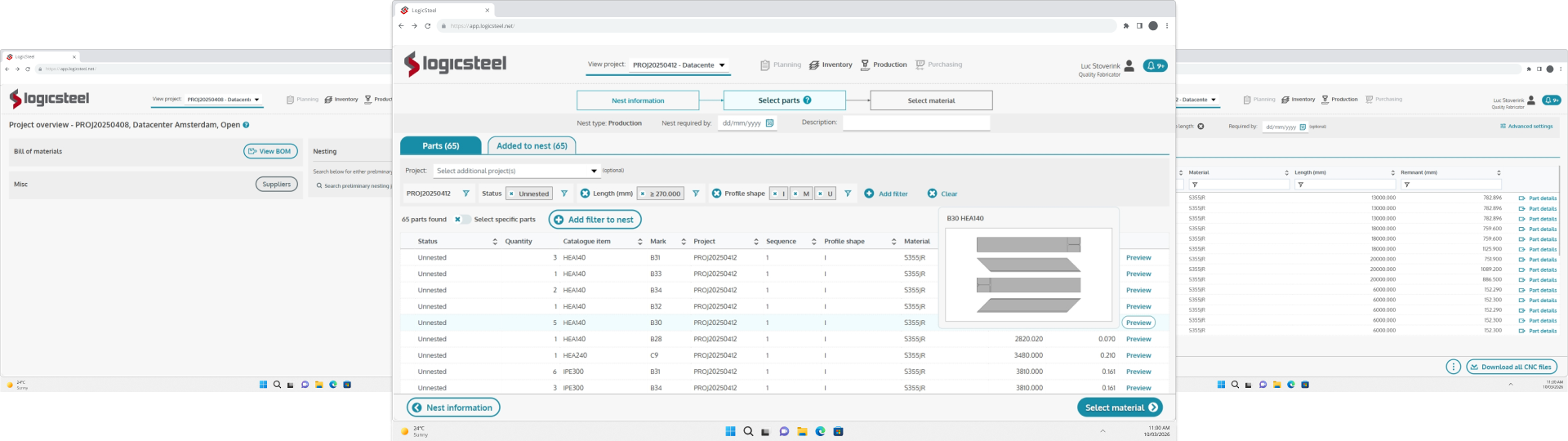
Create new nests by choosing your nest type, the machine you want to use for production, grouping, or enabling options such as block nesting or part‑grade matching. LogicSteel CADCAM automatically matches your selections with the correct production settings.
EASY PART SELECTION
Quickly locate the right profiles using filters for project, status, or profile shape. Add items to the nest with one action and browse a structured list displaying quantities, catalogue items, materials, and profile dimensions. Each item includes a 2D preview, and you can fine‑tune your selection using additional filters.
OPTIMIZED MATERIAL SELECTION
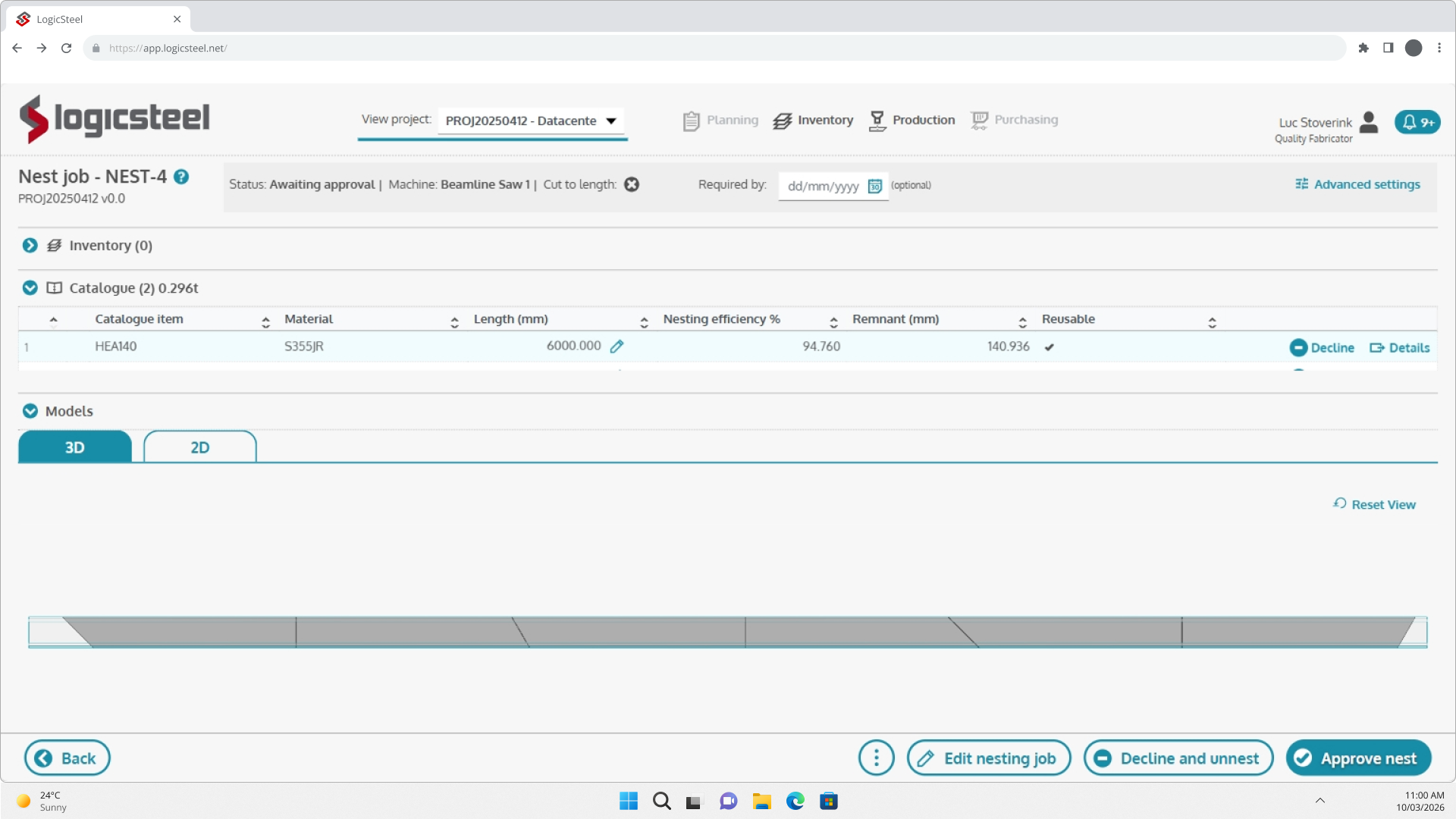
CADCAM calculates the profile requirements for your job and lets you pick from available stock, remnants, or catalogued materials. Details such as dimensions, certifications, material grades, heat numbers, and CE markings are displayed for full traceability.
ONE‑CLICK CAM INSTRUCTIONS
Generate all required CAM instructions with a single click. Inspect nests in 2D and 3D, verify material usage, and then choose to either download the nesting files or send the finalized CAM data directly to the production floor.
LOGICSTEEL SMART SUPPORT
LogicSteel automatically recognizes your current stage in the workflow and presents relevant tips, instructions, and knowledge‑base suggestions. As you progress, guidance updates in real time. And when you need more help, dedicated LogicSteel support is available 24 hours a day.

LOGICSTEEL CADCAM
Across plate, profile, and automatic welding workflows, LogicSteel CADCAM speeds up the CAD/CAM process. Its cloud‑based setup, unlimited user model, and value‑based pricing keep operations efficient and help maintain the lowest cost of ownership.



Plate
Converts CAD designs for steel plates into optimized cloud‑based CAM instructions.
Profile
Converts CAD designs for steel profiles into optimized cloud‑based CAM instructions.
Weld
Converts CAD designs for the Voortman Fabricator into optimized cloud‑based CAM instructions.
QUESTIONS?
We are happy to help!
If you have any questions about LogicSteel CADCAM or need help finding the right solution for your business, feel free to get in touch with us directly. For quick answers to common questions, check out the frequently asked questions below, where we’ve compiled a list of the questions we receive most often.
LogicSteel CADCAM is a CAD/CAM solution that streamlines work preparation for steel profile processing. It automatically converts design data into optimized profile nests and generates CNC instructions, enabling teams to prepare production faster and with greater accuracy.
Key outcomes include:• lower material waste
• shorter preparation times
• a smoother and more predictable production workflow
The system is designed for work preparators, planners, and production teams in steel processing companies, anyone responsible for preparing profile cutting jobs for the shop floor.
Many nesting tools still rely heavily on manual work and operator experience. LogicSteel CADCAM takes an automation‑first approach:
- optimal nests are generated automatically
- the user only steps in when something needs review
- work preparation can be done more quickly
This reduces repetitive work and ensures consistent, high‑quality results.
Manual profile nesting is slow and often inconsistent. Automatic nesting makes the process faster and more reliable.
With automatic nesting:
- nests are created within minutes
- material yield is optimized without manual trial‑and‑error
- more jobs can be processed in less time
- users stay in control without manually building each nest
- Everyone can take on nesting tasks
LogicSteel CADCAM uses smart algorithms to optimize:
- Web and flange nesting (For sawing machines like the VB range)
- Contour nesting (For coping machines like the V807)
- the use of offcuts and remnants
This ensures each profile is used as efficiently as possible.
LogicSteel CADCAM is developed within Voortman Steel Machinery, giving it direct insight into:
- machine behavior and capabilities
- cutting strategies
- typical production flows
As a result, the CNC programs produced by the software align perfectly with the real performance of Voortman profile‑processing machines.
Does LogicSteel CADCAM support both plates and profiles?
Yes. LogicSteel CADCAM handles:
- 2D plate nesting
- 1D beam and profile nesting
This allows companies to manage multiple production streams from one unified platform.
Yes. Once the nest is created, LogicSteel CADCAM automatically generates CNC programs ready for the shop floor.
This means work preparators:
- no longer need to perform manual CAM programming
- can release jobs to production much faster
By automating nesting and CAM generation, work‑preparation time is drastically reduced.
Many companies see:
- faster work preparation
- significantly less manual effort
- tighter, more consistent planning
This allows work preparators to focus on exceptions instead of repetitive tasks.
Steel processors select LogicSteel CADCAM because it:
- automates critical work‑preparation steps
- maximizes material efficiency
- accelerates nesting performance
- integrates seamlessly with Voortman machinery
- improves overall production flow
The result is a faster, cleaner path from CAD drawing to finished product.